Inside a DataFusion Parquet Scan: Skipping Page Index I/O When Statistics Already Decide
How a Parquet scan reads a file end to end — footer, row groups, page index, bloom filters — and why PR #22857 stops loading page index metadata when row-group statistics already prove the filter.
When you run a query like SELECT * FROM parquet_table WHERE col IS NOT NULL, DataFusion may still reach out to object storage and read Parquet page index structures — even though the coarser row-group statistics already prove every surviving row group matches the filter. That extra round of I/O buys nothing.
PR #22857 (merged, closes #22795) reorders the Parquet reader so page index loading happens only when page-level pruning can still help. No query results change — only unnecessary metadata reads disappear.
To understand the fix, it helps to first understand how a Parquet file is read from start to finish.
How a Parquet file is laid out
Parquet is a columnar format. Instead of storing rows one after another, it groups values from the same column together so a scan can read only the columns a query needs and compress them well.
A file is organized as a hierarchy:
- The file is split into row groups — horizontal slices of the table, each holding a few hundred thousand to a few million rows.
- Within a row group, each column is stored as a column chunk.
- Each column chunk is split into data pages — the smallest unit that gets decoded, usually a few thousand rows.
- At the very end sits the footer, which holds the schema and all the planning metadata: the list of row groups, per-column statistics, and pointers to optional index structures.
A reader always starts at the footer, because that is where it learns what the file contains and what it can safely skip.

The three structures used for skipping data
The whole point of all this metadata is to avoid reading data the query does not need. Parquet offers three levels of “skip” information, each finer-grained and more expensive to fetch than the last:
| Structure | Granularity | What it stores | What it lets you skip |
|---|---|---|---|
| Row-group statistics | Entire row group | min, max, null count per column | Whole row groups |
| Page index (ColumnIndex + OffsetIndex) | Individual data pages | min/max/null per page, byte offsets | Individual pages inside a row group |
| Bloom filters | Row group + column | Probabilistic membership | Row groups on equality predicates |
Row-group statistics live inside the footer you already read, so they are essentially free. The page index and bloom filters are separate blocks that require extra reads from storage. On a local disk that is cheap; on object storage like S3, every one of those reads is a network round trip that adds latency.
The page index shines for range filters like col > 50, where a row group’s overall min/max is too coarse to rule the group out but most individual pages can still be skipped. It is useless when the statistics already prove the predicate is true for every row in a row group — there is nothing left to skip.
Reading a file, step by step
For each file in a scan, DataFusion runs through an ordered pipeline. Each stage either does cheap in-memory pruning or pays for some optional I/O, and each stage narrows down what the next one has to look at.
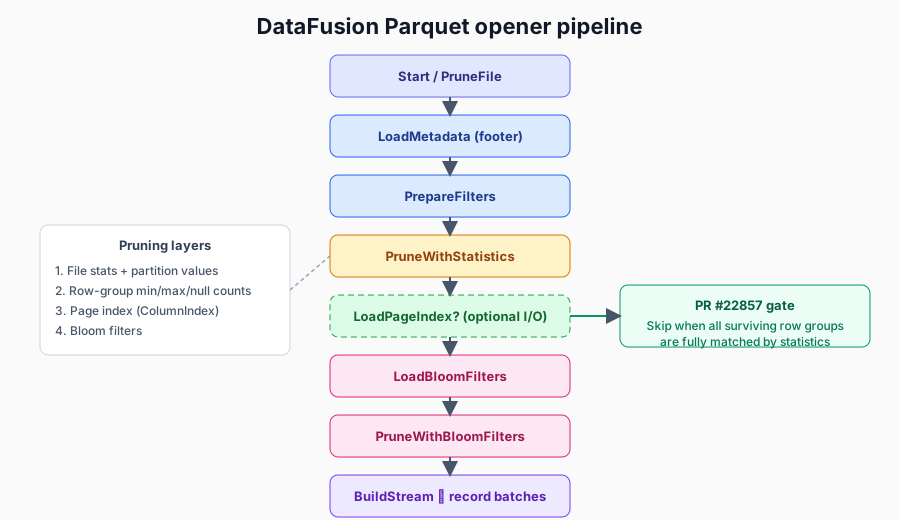
- Prune the file — using file-level statistics and partition values, entire files can be dropped before anything is even opened.
- Load the footer — read the schema, the row-group list, and the row-group statistics.
- Prepare the filters — adapt the query’s predicate to this file’s schema and build the row-group and page pruning logic.
- Prune with row-group statistics — check each row group’s min/max/null counts. Groups that cannot match are dropped. Groups where the statistics prove every row matches are marked fully matched (for example,
IS NOT NULLon a column that has zero nulls in that group). - Load the page index (optional) — an extra read for the per-page ColumnIndex and OffsetIndex.
- Load and apply bloom filters (optional) — extra I/O to rule out row groups on equality checks.
- Build the read stream — assemble the final selection of row groups and pages, then decode the actual data.
The expensive parts of this pipeline are not the comparisons — those are fast in-memory boolean checks. The cost is in the optional storage reads for the page index and bloom filters. The art of an efficient scan is fetching those only when a cheaper layer has left some genuine uncertainty.
What the page index actually does
Inside a surviving row group, the page index lets the reader prune at the page level. ColumnIndex records the min/max/null statistics for each page, and OffsetIndex records where each page sits on disk. With both, the reader can intersect the predicate against each page and skip the pages that cannot possibly match — without decoding them.
But there is a catch. If a row group is already fully matched — the statistics have proven every single row satisfies the filter — then page-level pruning has nothing to do. Every page in that group is going to be read regardless. Loading the page index for it is pure waste.
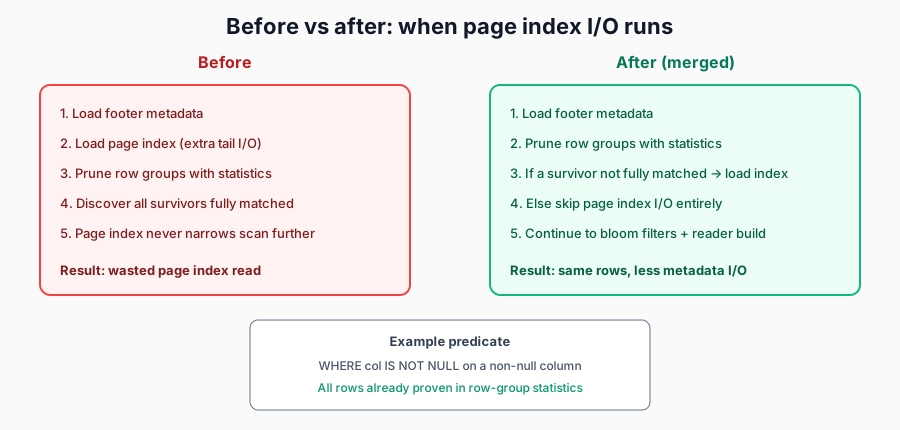
That was exactly the inefficiency. In the original ordering, the page index was loaded before row-group statistics pruning ran its course. So the reader paid for ColumnIndex and OffsetIndex I/O even in cases where every surviving row group would end up fully matched and the page index could never have changed a thing.
What the optimization changes
The fix is a reordering plus a guard. Row-group statistics pruning now runs first, and only then does the reader decide whether the page index is worth fetching.
The page index is loaded only when both of these are true:
- The query actually has a predicate that the page index could use.
- At least one surviving row group is not fully matched by row-group statistics — i.e. there is still uncertainty that finer-grained page pruning could resolve.
If neither condition holds, the reader skips straight past page index loading to the next stage. When it skips a load that would otherwise have happened, it records a page_index_load_skipped metric so the savings are observable.
A concrete example
Take a file where column a has no nulls anywhere, and a query filtering on a IS NOT NULL.
| Step | What happens |
|---|---|
| Predicate | a IS NOT NULL |
| After row-group statistics pruning | Every surviving row group is marked fully matched |
| Before the fix | Page index loaded anyway — wasted I/O |
| After the fix | Page index load skipped, metric incremented |
Contrast that with a range filter like a > 50. There, the row groups usually come out not fully matched — the overall min/max spans the threshold — so the page index still loads and still earns its cost by pruning individual pages inside those coarse groups.
How to see it in action
Enable DataFusion execution metrics and look for page_index_load_skipped on the Parquet scan nodes. A non-zero count means the reader recognized that row-group statistics already settled the filter and avoided page index I/O that would not have changed the scan plan.
The win is not faster comparisons — it is fewer metadata reads against storage. That matters most for files on object storage and for scans that touch a large number of files, where each saved read is a saved round trip.
Takeaways
- Parquet pruning is hierarchical — file → row group → page → bloom. Each layer costs either CPU or I/O. Only pay for a finer layer when a cheaper one leaves real uncertainty.
- Fully matched row groups are a strong signal — once statistics prove every row matches, no finer index can prune anything further.
- Correctness is untouched — this is purely about planning the scan more cheaply. The exact same rows are read; the reader just stops fetching metadata it cannot use.